
Lăng Thị Cẩm Nhung
Intern
I. OpenSearch và OpenSearch Dashboards
1. OpenSearch
OpenSearch là một công cụ tìm kiếm và phân tích dữ liệu phân tán (distributed search & analytics engine), phát triển dựa trên Apache Lucene- Các thành phần chính của OpenSearch:
- OpenSearch Dashboards: giao diện trực quan (UI) để hiển thị dữ liệu từ OpenSearch.
- Data Prepper: công cụ thu thập và xử lý dữ liệu phía server, có thể lọc, làm giàu (enrich), biến đổi (transform), chuẩn hóa (normalize), và tổng hợp (aggregate) dữ liệu trước khi phân tích/hiển thị.
- Clients: các API ngôn ngữ (Python, Java, JavaScript, v.v.) để giao tiếp với OpenSearch từ ứng dụng.
- MCP Server (Model Context Protocol): tính năng mới, cho phép AI assistant tương tác trực tiếp với OpenSearch.
2. OpenSearch Dashboards
Là công cụ trực quan (UI) đi kèm với OpenSearch, tương tự như Kibana trong Elasticsearch.- Nó cho phép:
- Khám phá dữ liệu (Discover): tìm kiếm, lọc, phân tích dữ liệu dạng raw
- Trực quan hóa dữ liệu (Visualizations): tạo biểu đồ, bản đồ, tag cloud, time series…
- Tạo Dashboard: gom nhiều visualization thành một màn hình tổng quan cho người dùng/nhà quản trị.
- Dev Tools: viết query trực tiếp bằng DSL (JSON query).
- Quản lý: index, mẫu dữ liệu, người dùng, bảo mật…
II. Fluentd:
Fluentd là một data collector mã nguồn mở (trình thu thập dữ liệu) được thiết kế để tạo ra một lớp logging thống nhất (unified logging layer). Cho phép thu thập, xử lý và phân phối log/data từ nhiều nguồn khác nhau (ứng dụng, server, container, dịch vụ cloud,…) đến nhiều nơi khác nhau (database, hệ thống lưu trữ, công cụ phân tích, SIEM, …).- Fluentd và Fluent Bit:
- Fluentd: phiên bản đầy đủ, nặng hơn, phù hợp cho máy chủ trung tâm (centralized log collection).
- Fluent Bit: phiên bản nhẹ, viết bằng C, ít tốn tài nguyên, phù hợp chạy trên edge devices hoặc container.
III. Thiết kế mô hình:
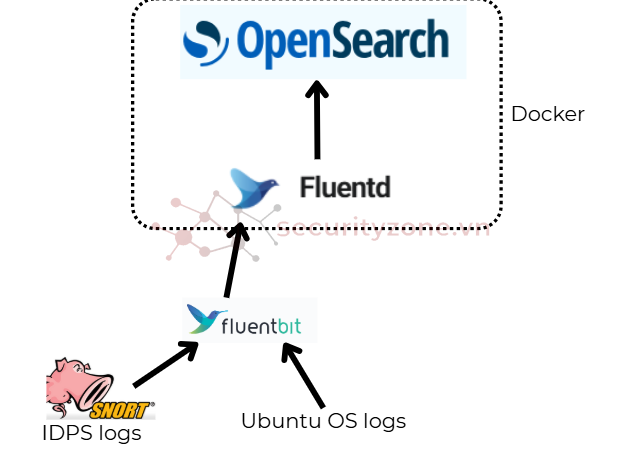
IV. Triển khai kiến trúc
1. Cài đặt Docker Engine + Docker Compose plugin
sudo apt-get updatesudo apt-get install -y docker-ce docker-ce-cli containerd.io docker-buildx-plugin docker-compose-plugin
Thêm user vào group docker
sudo usermod -aG docker $USER
newgrp docker
Kiểm tra cài đặt:
docker --version
docker compose version
2. Cấu hình Docker compose:
Tạo file mini-siem/docker-compose.ymlNội dụng file như sau:
version: '3.8'
networks:
siem-net:
driver: bridge
services:
# OpenSearch
opensearch:
image: opensearchproject/opensearch:3.2.0
container_name: opensearch
environment:
- cluster.name=siem-cluster
- node.name=opensearch
- bootstrap.memory_lock=true
- OPENSEARCH_JAVA_OPTS=-Xms1g -Xmx1g
- OPENSEARCH_INITIAL_ADMIN_PASSWORD=Str0ng#Passw0rd
- discovery.type=single-node
ulimits:
memlock:
soft: -1
hard: -1
nofile:
soft: 65536
hard: 65536
volumes:
- ./data/opensearch:/usr/share/opensearch/data
networks:
- siem-net
ports:
- "9200:9200"
# OpenSearch Dashboard
dashboard:
image: opensearchproject/opensearch-dashboards:3.2.0
container_name: opensearch-dashboards
environment:
- OPENSEARCH_HOSTS=https://opensearch:9200
networks:
- siem-net
ports:
- "5601:5601"
depends_on:
- opensearch
# Fluentd
fluentd:
build:
context: ./fluentd
dockerfile: Dockerfile-fluentd
container_name: fluentd
volumes:
- ./logs:/fluentd/log
networks:
- siem-net
ports:
- "24224:24224" # TCP
- "24224:24224/udp" # UDP
depends_on:
- opensearch
volumes:
opensearch-data:
3. Cấu hình Fluentd
Vào thư mục mini-siem tạo thêm:- data/opensearch
- fluentd/conf/
Vào thư mục fluentd tạo file Dockerfile-fluentd file này là file Dockerfile Fluentd riêng, cài plugin OpenSearch
# Dockerfile-fluentd
FROM fluent/fluentd:v1.16-debian-1
# Switch sang root để cài gem
USER root
# Cài plugin OpenSearch
RUN gem install fluent-plugin-opensearch --no-document
# Tạo thư mục cache gem và cấu hình quyền
RUN mkdir -p /home/fluent/.local/share/gem && \
chown -R fluent:fluent /home/fluent/.local
# Chuyển lại user fluent
USER fluent
# Copy cấu hình Fluentd vào container
COPY ./conf/fluent.conf /fluentd/etc/
# Expose port
EXPOSE 24224 24224/udp
# CMD mặc định
CMD ["fluentd", "-c", "/fluentd/etc/fluent.conf"]
Vào thư mục mini-siem/fluentd/conf tạo fluent.conf<source>
@type forward
port 24224
bind 0.0.0.0
</source>
<match **>
@type opensearch
host opensearch
port 9200
scheme https
ssl_verify false
ssl_version TLSv1_2
user admin
password "Str0ng#Passw0rd"
index_name fluentd_test
include_timestamp true
</match>
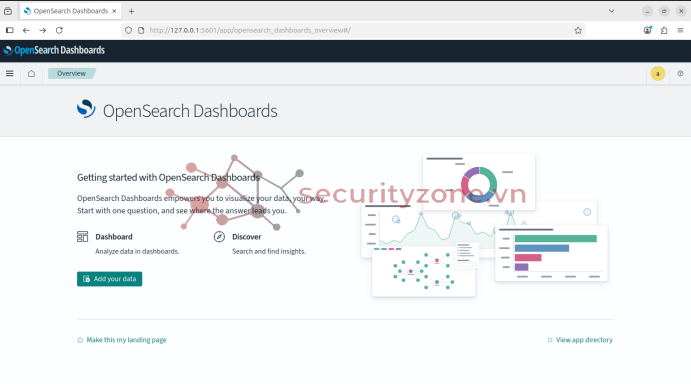
Vào thư mục mini-siem chạy docker compose up -dTruy cập vào Opensearch Dashboards http://localhost/5601 bằng tài khoản: admin / Str0ng#Passw0rd
Giao diện của dashboard:
4. Cấu hình agent đẩy log về cho Flutentd:
Trên agent có nguồn log từ snort3,Cài fluent bit cho VM ubuntu: Link hướng dẫn
Sau khi cài xong fluent bit cho ubuntu ta thực hiện start dịch vụ:
sudo systemctl start fluent-bit
Theo mặc định, Fluent Bit sẽ thu thập CPU metrics và ghi log ra /var/log/syslog, có thể kiểm tra tail -f /var/log/syslog | grep fluent-bit
Cấu hình fluent-bit.conf để thu thập logs từ 2 nguồn là Snort3 và nguồn log hệ thống.[SERVICE]
# Flush
# =====
# set an interval of seconds before to flush records to a destination
flush 1
# Daemon
# ======
# instruct Fluent Bit to run in foreground or background mode.
daemon Off
# Log_Level
# =========
# Set the verbosity level of the service, values can be:
#
# - error
# - warning
# - info
# - debug
# - trace
#
# by default 'info' is set, that means it includes 'error' and 'warning'.
log_level info
# Parsers File
# ============
# specify an optional 'Parsers' configuration file
parsers_file parsers.conf
# Plugins File
# ============
# specify an optional 'Plugins' configuration file to load external plugins.
plugins_file plugins.conf
# HTTP Server
# ===========
# Enable/Disable the built-in HTTP Server for metrics
http_server Off
http_listen 0.0.0.0
http_port 2020
# Storage
# =======
# Fluent Bit can use memory and filesystem buffering based mechanisms
#
#
# storage metrics
# ---------------
# publish storage pipeline metrics in '/api/v1/storage'. The metrics are
# exported only if the 'http_server' option is enabled.
#
storage.metrics on
# storage.path
# ------------
# absolute file system path to store filesystem data buffers (chunks).
#
# storage.path /tmp/storage
# storage.sync
# ------------
# configure the synchronization mode used to store the data into the
# filesystem. It can take the values normal or full.
#
# storage.sync normal
# storage.checksum
# ----------------
# enable the data integrity check when writing and reading data from the
# filesystem. The storage layer uses the CRC32 algorithm.
#
# storage.checksum off
# storage.backlog.mem_limit
# -------------------------
# if storage.path is set, Fluent Bit will look for data chunks that were
# not delivered and are still in the storage layer, these are called
# backlog data. This option configure a hint of maximum value of memory
# to use when processing these records.
#
# storage.backlog.mem_limit 5M
[INPUT]
name cpu
tag cpu.local
# Read interval (sec) Default: 1
interval_sec 2
[INPUT]
Name tail
Path /var/log/syslog
Tag syslog
[INPUT]
Name tail
Path /var/log/auth.log
Tag auth
[INPUT]
Name tail
Path /var/log/kern.log
Tag kernel
# Log Snort
[INPUT]
Name tail
Path /var/log/snort/alert_full.txt
Tag snort.alert_fast
[OUTPUT]
Name forward
Match *
Host 192.168.223.136
Port 24224
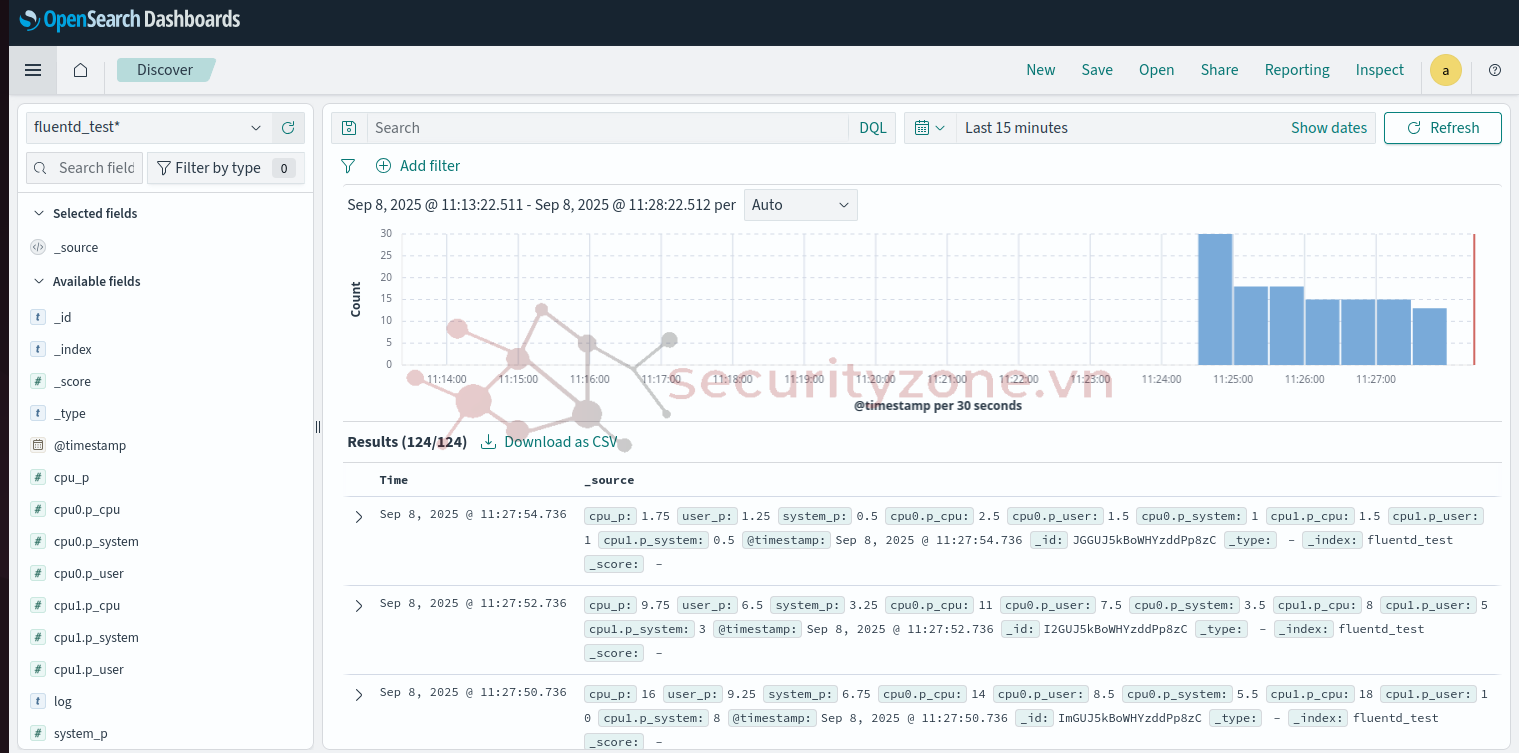
Sau khi khởi động lại fluent-bit thì vào lại Opensearch Dashboards thấy được các log đã thu thập được.
Bài viết liên quan
Bài viết mới